
Save maps, addresses and translations offline
A good address is of little use if it is only stored in an app or a message that you can’t open when you’re offline. So save important locations in several formats: as complete text, in the local spelling, in a Latin transliteration and, if needed, as an easy-to-read screenshot. That way, you can show someone your destination, compare it with your ticket and find it again even if the mobile network goes down.
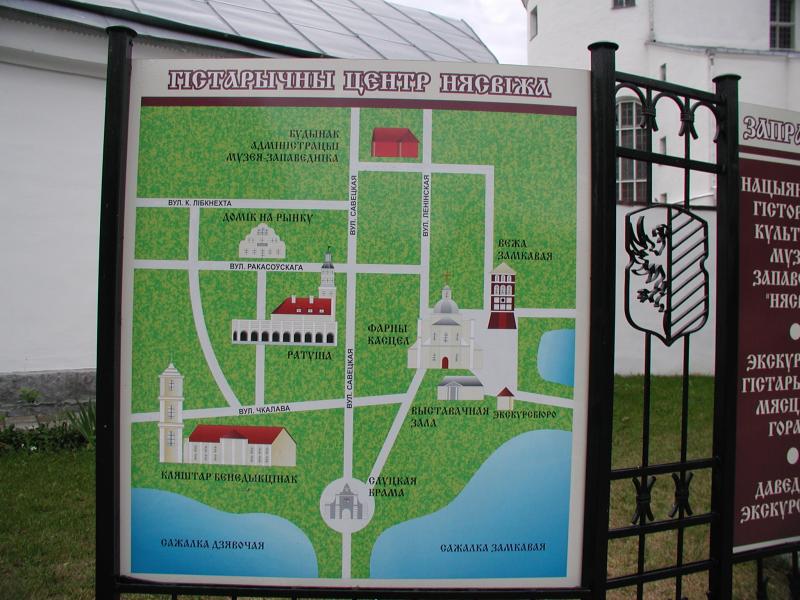 Kartenstand mit Wegen, Sehenswürdigkeiten und kyrillischen Orts- und Straßenangaben.
Photo: Markus Lenk
Kartenstand mit Wegen, Sehenswürdigkeiten und kyrillischen Orts- und Straßenangaben.
Photo: Markus Lenk
At a glance: Maps, addresses and translation offline
- Save the full details for your accommodation, railway station, airport, meeting point and emergency contact address.
- Copy place names exactly as they appear in your booking, ticket or official address.
- If the local language uses a different script, add the local spelling and a readable transliteration.
- Keep important details as text and as an image that can be viewed offline.
- Check the address, district, building number, stop and phone number together.
- Before you leave, test your saved map areas and addresses without an internet connection.
Which details you’ll actually need on the go
Start with the places you absolutely need to reach. These include your accommodation, your first railway station or airport, a meeting point and an address to use if you need help. For each one, save the full name, street and building number, district, city or town, country and, if available, a phone number. For a hotel or holiday rental, also add the booking reference to your note. Your digitally saved travel documents provide the basis for this.
Organise the details in travel order: arrival, accommodation, first outing, onward journey and return trip. The travel checklist and itinerary will help you review your collection in good time. For your first journey after arrival, transfers and local public transport are important; if you need to change trains, rail travel and railway stations provide additional details such as the platform, station and direction of travel.
Combine the original script, transliteration and address
In countries that use a different script, the same place may appear differently on your ticket, on signs and in a map app. So save the name in the original script and in an easy-to-read transliteration. The information on language and communication can help you prepare for these situations. When entering a place in an app, it helps to copy the spelling from your booking first and then compare it with the local display.
Don’t shorten an address to just the name of the city. Stations, airports, ports, districts and streets with the same name can be far apart. The information on different scripts and place names explains why you should save the original name, transliteration and type of destination together. When crossing borders or travelling through several countries, also check entry requirements and documents and transit and onward travel separately.
Offline maps and notes you can show others
Download the map area you need before you leave, then open it once in offline mode. Check that your accommodation, railway station and meeting point are actually visible. A saved route is useful, but it doesn’t replace the full destination address, since road closures or a missed connection may change the first leg of your journey. Backup plans, contacts and a Plan B are useful for dealing with such changes.
Create a short note for each important destination that you can show someone. A screenshot of your booking or a PDF can also help, but make sure it’s up to date, large enough to read and doesn’t have any cut-off lines. Save phone numbers not only in your contacts but also in the note for each destination. That way, you can still find the number if you change phones or accidentally give a contact a different name.
Compare addresses on tickets with your route
Before each onward journey, compare the destination on your ticket with the information provided by the transport operator. Check the district, terminal, railway station, stop number, direction and departure time. For a bus or ferry, the departure point may have a different name from the city. The information on long-distance buses and ferry services can help you tell them apart.
Have a second payment option ready in case you need to pay for a ticket, transfer or short taxi ride while you’re on the go. A card, cash and a backup payment option are therefore part of your offline preparations. If you’re travelling with others, make sure a second person can access the most important addresses. That way, the group can still get around if someone’s phone runs out of battery or they need to take a different route at short notice.
Do a simple test the day before you leave: turn off your connection, open your saved maps and read the most important addresses aloud. While you do this, compare the spelling, building number and type of destination with your ticket or booking confirmation. You’ll spot any missing characters while you’re still at home, where they’re easier to fix than at an unfamiliar station.
Frequently asked questions
Which destinations should I save offline?
The most important ones are your accommodation, arrival point, key transfer points, meeting places, return journey and an emergency address where you can be reached.
Is a screenshot of the address enough?
It’s a useful backup, but you should also save the address as text and keep the phone number. That way, you can search for, copy or read the details aloud.
Which spelling should I use for a booking?
Use the form required by the booking document or identity document. For finding your way around, also save the original spelling and a transliteration.
How do I check an offline map?
Disconnect from the internet, open the saved area and search again for your accommodation, railway station and meeting point.
